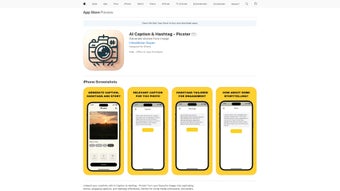

Download Picster – AI Caption & Hashtag Generator for Social Media
Overview
Picster is a subscription‑based AI writing assistant built specifically for iOS users who want to supercharge their social‑media presence. Whether you’re an influencer striving for higher engagement, a digital marketer looking to streamline campaign creation, or simply a casual user who wants their posts to stand out, Picster offers a smart, data‑driven way to craft captions and hashtags that resonate with target audiences. The core premise is simple yet powerful: harness the latest natural‑language processing models to suggest context‑relevant captions, trending hashtags, and even provide a rating system where users can share feedback on the quality of suggestions.
By analyzing millions of public posts across platforms like Instagram, TikTok, Twitter, and Facebook, Picster identifies patterns that help your content appear in the right feeds at the right time. The app also integrates a community‑driven review module, allowing users to rate suggestions, flag irrelevant tags, and contribute to a continuously improving suggestion engine. While the interface details are not fully disclosed, the emphasis on AI‑powered content enhancement, subscription flexibility, and a user‑generated rating system makes Picster a compelling tool for anyone serious about boosting visibility, click‑through rates, and overall social media performance.
In a crowded market of generic caption generators, Picster differentiates itself with its focus on iOS optimization, real‑time relevance scoring, and a feedback loop that learns directly from its user base, promising a more personalized and effective content creation experience.
Key Features
- AI‑Generated Captions: Uses advanced language models to produce caption options tailored to the image, video, or theme you upload.
- Trending Hashtag Suggestions: Scans current platform trends and recommends hashtags that maximize discoverability.
- Contextual Relevance Scoring: Each suggestion receives a relevance score based on engagement data, helping you pick the most effective option.
- Rating & Review System: Users can rate the usefulness of each caption/hashtag pair, feeding back into the AI for continuous improvement.
- Multi‑Platform Export: Directly copy suggestions to Instagram, TikTok, Twitter, or any other social channel with a single tap.
- Subscription Flexibility: Monthly or annual plans with a free trial period, allowing you to test the service before committing.
- Secure Cloud Sync: Your favorite captions and hashtag sets are stored securely in the cloud, accessible across all your iOS devices.
- Analytics Dashboard (Roadmap): Future updates promise a built‑in analytics view showing how suggested tags performed over time.
Each feature is designed with the end‑user in mind, ensuring that the workflow from idea to post remains frictionless. The AI engine learns not only from global trends but also from your personal style, adapting suggestions as you consistently rate and use the tool. This adaptive learning loop means that the longer you use Picster, the more aligned the output becomes with your brand voice and audience preferences. Moreover, the subscription model guarantees regular updates, bug fixes, and new feature rollouts without the need for manual downloads, keeping the app secure and up‑to‑date with the latest platform policies. In essence, Picster provides a comprehensive toolkit that merges creativity, data intelligence, and community feedback into a single, iOS‑native experience.
Installation, Usage & Compatibility
Getting started with Picster is straightforward. First, open the App Store on your iPhone or iPad and search for “Picster – Caption & Hashtag.” Tap the Get button, confirm with Face ID, Touch ID, or your Apple ID password, and the app will download within seconds thanks to Apple’s fast CDN. Once installed, launch the app and you’ll be greeted with a brief onboarding tutorial that explains how to grant photo library access, choose your preferred social platform, and set your content goals (e.g., brand awareness, follower growth, or engagement spikes). The onboarding also invites you to start a free 7‑day trial, after which you’ll be prompted to select a subscription tier.
To create a caption, simply tap the New Post button, upload a photo or video, and let Picster’s AI analyze the visual content. Within a few seconds, the app presents a list of caption options, each accompanied by a relevance score and a set of suggested hashtags. You can swipe through alternatives, tap a star to rate the suggestion, or edit the text manually before copying it to your clipboard. The Hashtag Builder lets you add or remove tags, and the built‑in Search function allows you to look up specific keywords for niche audiences. All actions are performed locally on your device, while the heavy‑lifting AI queries run securely in the cloud, ensuring fast response times without compromising privacy.
Picster is currently compatible with iOS 13 and later, supporting iPhone, iPad, and iPod touch models. The app is optimized for both portrait and landscape orientations, and it takes advantage of iOS’s native sharing extensions, allowing you to invoke Picster directly from the Photos app or any third‑party social media client. Because the service relies on an internet connection for AI processing, a stable Wi‑Fi or cellular data link is recommended for the best performance. Regular updates are delivered through the App Store, ensuring that the software stays compatible with the latest iOS releases and platform policy changes.
Pros and Cons
Pros
- AI‑driven captions save time and boost creativity.
- Real‑time trending hashtag suggestions improve post discoverability.
- User rating system creates a community‑curated knowledge base.
- Seamless iOS integration with secure cloud sync.
- Flexible subscription model with a free trial period.
Cons
- Only available on iOS; Android users must look for alternatives.
- Subscription may be a barrier for casual users on a tight budget.
- Dependence on internet connection for AI processing.
- Limited customization of AI tone beyond the provided presets.
- Current version lacks a built‑in analytics dashboard (planned for future release).
FAQ & Conclusion
Is Picster really free to try?
Yes, Picster offers a 7‑day free trial that gives you full access to all caption and hashtag features. No credit card is required to start the trial, and you can cancel anytime before the subscription auto‑renews.Can I use Picster for multiple social platforms?
Absolutely. Picster supports caption generation for Instagram, TikTok, Twitter, Facebook, and LinkedIn. You can select your target platform during the onboarding process or switch anytime in the settings.How does the rating system improve suggestions?
Each time you rate a caption or hashtag as helpful, the AI records that feedback and adjusts its relevance model. Over time, the system learns your style preferences and the types of tags that generate the most engagement for your niche.Is my personal data safe with Picster?
Picster follows Apple’s privacy guidelines and uses encrypted connections for all cloud communication. Your photos remain on your device, and only the metadata needed for AI processing is sent securely to the server. No personal identifiers are stored or sold.Will Picster work on older iPhones?
The minimum requirement is iOS 13, which means iPhone 6s, SE (1st gen) and newer are supported. If your device runs an older iOS version, you’ll need to upgrade the OS or consider an alternative solution.In summary, Picster is a robust, AI‑powered companion for anyone serious about optimizing their social‑media captions and hashtags. Its iOS‑first design, community‑driven rating system, and real‑time trend analysis provide a competitive edge that can translate directly into higher engagement rates and follower growth. While the subscription cost and platform limitation are worth considering, the value delivered—especially for influencers and marketers—justifies the investment. Ready to make your posts stand out? Download Picster today, start your free trial, and watch your social media performance soar.



.png)



